Fixing Multi-Role Access & RLS in a Supabase App
A practical Supabase Row Level Security design for customer, staff, and admin access, including safe helper functions, tests, and performance checks.
 SprintX Team11 min read
Your customer signs in and sees an empty order history. A staff member cannot update an order. Then an admin test succeeds—because it used a service key that skipped the rules everyone else must follow.
That combination usually means the application does not have a role problem. It has an authorization design problem.
This guide builds one coherent Supabase Row Level Security (RLS) example for three application roles: customer, staff, and admin. The SQL uses a database table as the source of truth, protects the role lookup, and makes every read and write rule explicit.
Quick mental model: table privileges decide whether a request may attempt an operation. RLS policies decide which rows that operation may affect. A normal permissive policy grants access when its expression is true; applicable permissive policies combine with OR. If no applicable policy grants access, access is denied.
Supabase maps a signed-in request to the Postgres authenticated role. “Customer,” “staff,” and “admin” below are application roles, not separate database login roles.
Start with one coherent schema
The example has an exposed public.orders table and a role table in a non-exposed private schema. Keeping authorization data outside public means clients cannot query it through the Data API by default.
Run schema changes through a migration, review them, and test them in a disposable project before production.
create type public.app_role as enum ('customer', 'staff', 'admin');

create schema if not exists private;
revoke all on schema private from public, anon, authenticated;

create table private.user_roles (
  user_id uuid primary key references auth.users(id) on delete cascade,
  role public.app_role not null default 'customer'
);

create table public.orders (
  id bigint generated always as identity primary key,
  customer_id uuid not null references auth.users(id),
  status text not null default 'pending',
  notes text,
  created_at timestamptz not null default now()
);

grant select, insert, update, delete on public.orders to authenticated;
alter table public.orders enable row level security;

create index orders_customer_id_idx on public.orders (customer_id);
RLS does not replace GRANT. A request needs the table privilege and a policy that admits the row. Conversely, a broad table grant does not defeat RLS for an ordinary role once RLS is enabled.
Only a trusted server-side process should assign staff or admin roles. Do not expose a client mutation that lets a user update their own row in private.user_roles.
Use a small, hardened role helper
A policy can query a role table directly, but repeating that query becomes noisy. It can also cause infinite recursion if the helper reads the same RLS-protected table whose policy is currently being evaluated.
This helper reads a separate table. It uses SECURITY DEFINER, so it runs with its owner's privileges rather than the caller's. That is powerful and deserves a narrow body, a trusted owner, an explicit search_path, schema-qualified objects, and restricted execution privileges.
create or replace function private.current_app_role()
returns public.app_role
language sql
stable
security definer
set search_path = ''
as $$
  select ur.role
  from private.user_roles as ur
  where ur.user_id = (select auth.uid())
$$;

revoke all on function private.current_app_role() from public;
grant usage on schema private to authenticated;
grant execute on function private.current_app_role() to authenticated;
Create the function as a trusted migration owner and do not later transfer it to an untrusted role. PostgreSQL warns that a SECURITY DEFINER function can be abused when its search_path includes schemas writable by untrusted users. Setting it to an empty path and qualifying every object removes that lookup ambiguity.
The function returns null when a user has no role row. None of the role comparisons below then evaluate to true, so that user gets no role-based access. Provision the customer role when you create the user rather than silently treating a missing record as privileged.
Write policies by operation
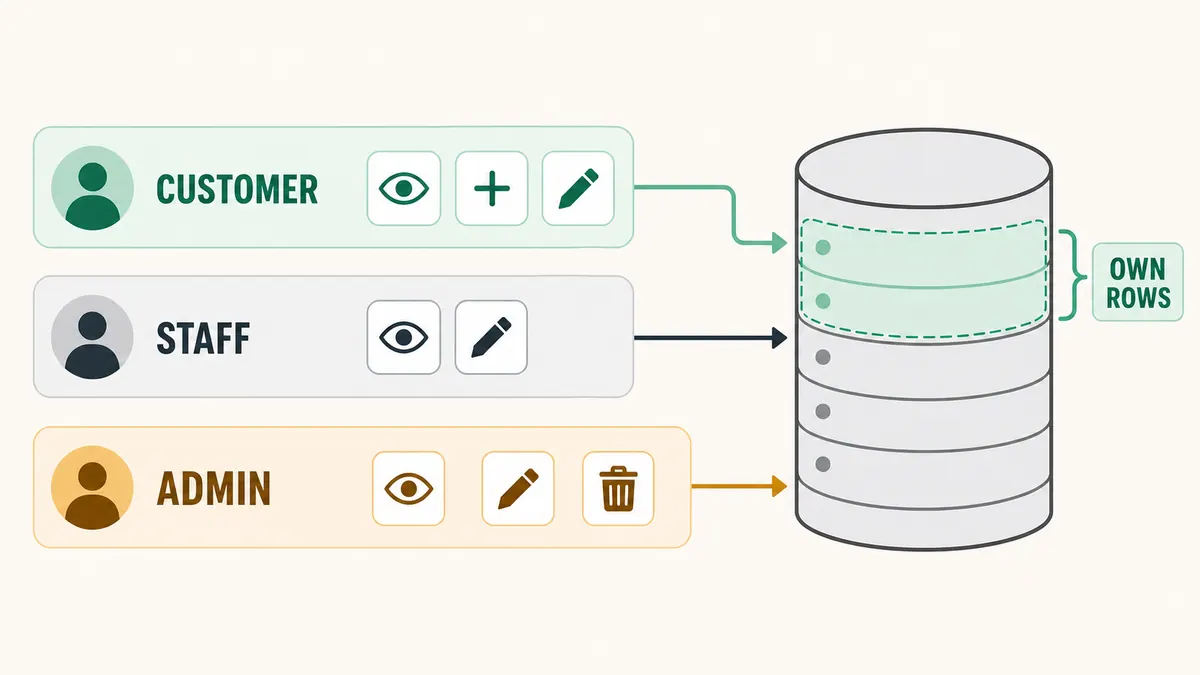
For SELECT and DELETE, USING determines which existing rows are visible to the operation. For INSERT, WITH CHECK validates the proposed row. An UPDATE should normally have both: USING checks the existing row, and WITH CHECK checks the resulting row.
Customers own their rows
create policy "customers read own orders"
on public.orders for select to authenticated
using (
  (select private.current_app_role()) = 'customer'
  and (select auth.uid()) = customer_id
);

create policy "customers insert own orders"
on public.orders for insert to authenticated
with check (
  (select private.current_app_role()) = 'customer'
  and (select auth.uid()) = customer_id
);

create policy "customers update own orders"
on public.orders for update to authenticated
using (
  (select private.current_app_role()) = 'customer'
  and (select auth.uid()) = customer_id
)
with check (
  (select private.current_app_role()) = 'customer'
  and (select auth.uid()) = customer_id
);
The update check prevents a customer from changing customer_id to another user. PostgreSQL also needs a matching SELECT policy for updates to work as expected.
This example lets customers update status and notes. That may be wrong for your product. RLS controls rows, not which columns inside an allowed row can change. If customers must only edit notes, use column privileges, a deliberately designed function, or a separate customer-editable table.
Staff manage orders; admins can also delete
create policy "staff and admins read all orders"
on public.orders for select to authenticated
using (
  (select private.current_app_role()) in ('staff', 'admin')
);

create policy "staff and admins update all orders"
on public.orders for update to authenticated
using (
  (select private.current_app_role()) in ('staff', 'admin')
)
with check (
  (select private.current_app_role()) in ('staff', 'admin')
);

create policy "admins delete orders"
on public.orders for delete to authenticated
using (
  (select private.current_app_role()) = 'admin'
);
These are permissive policies, the default. PostgreSQL combines applicable permissive policies with OR. A customer can therefore update an owned row through the customer policy, while staff can update any row through the staff/admin policy. Do not assume that adding a second policy narrows the first. Use a restrictive policy only when you intentionally need an AND-style condition and have tested how it combines with the permissive policies.
The service key is not an admin login
Supabase service keys can bypass RLS. They belong only in trusted server environments and must never appear in a browser bundle, mobile app, log, screenshot, or customer-facing tool. If one leaks, rotate it.
There is a subtle client behavior too: Supabase documents that a client initialized with a service key still follows the signed-in user's RLS policies if that client is also carrying a user session. Do not build an authorization model around that nuance. Keep privileged maintenance clients isolated from user-session clients, and use an ordinary user token for every RLS test.
An admin application role should normally pass explicit admin policies as shown above. It should not receive the service key.
Test the denial paths, not just the happy path
Create two customers plus one staff and one admin test account. Give each an actual role row, sign in normally, and run the same operations with each user's access token.
| Attempt | Customer A | Customer B | Staff | Admin |
|---|---|---|---|---|
| Read A's order | Allow | Deny | Allow | Allow |
| Insert order owned by A | Allow | Deny | Deny | Deny |
| Insert order owned by B | Deny | Allow | Deny | Deny |
| Update A's order | Allow | Deny | Allow | Allow |
| Change A's order owner as customer A | Deny | — | — | — |
| Delete A's order | Deny | Deny | Deny | Allow |
Also test an unauthenticated request and an authenticated user with no user_roles row; both should be denied. Verify zero-row reads and rejected writes. Then repeat after changing a customer to staff and after removing a role.
Do not use the dashboard's table view or a service-key script as proof that a user policy works. Those contexts may have privileges the application user does not.
Table roles versus JWT claims
The helper above reads the database rather than waiting for a JWT refresh. Under the usual READ COMMITTED isolation, a role change is visible to the next request or statement; longer-lived transactions still follow PostgreSQL's normal snapshot rules. That makes revocation behavior easier to reason about.
Supabase also supports custom claims through a Custom Access Token Auth Hook. A claim can avoid a role-table lookup, and auth.jwt() can read it in a policy. The trade-off is freshness: Supabase warns that authorization data read through auth.jwt() may not be fresh, because an existing JWT does not gain updated claims until it is refreshed. A demoted user's existing token can retain the previous claim until refresh or expiry.
Use claims when the performance benefit matters and your security design explicitly accepts that revocation window. Keep authorization claims in server-controlled app metadata, not user-editable metadata. For rapid revocation or frequently changing roles, the table-backed check is usually clearer.
Keep policy performance predictable
RLS expressions run as part of normal queries, so measure them with realistic data and EXPLAIN (ANALYZE, BUFFERS) in a safe environment.
- Index columns used to match rows. Here,
orders.customer_idis indexed andprivate.user_roles.user_idis already a primary key. - Wrap stable, row-independent helpers in
select, as the policies do. Supabase recommends this pattern so PostgreSQL can use an init plan rather than call the function for every row. - Still add an application filter such as
.eq('customer_id', user.id)for customer queries. RLS remains the security boundary; the filter gives the planner useful information and reduces returned work. - Scope policies with
to authenticatedso they are not evaluated for roles that can never pass.
A pre-launch RLS checklist
Before real customer data arrives, confirm:
- Every exposed table, view, and function has been reviewed; RLS is enabled on exposed tables that need row isolation.
- Each operation has the intended table grants and policies.
- Inserts and updates validate the resulting row with
WITH CHECK. - Helper functions do not recurse into the table they protect.
- Every
SECURITY DEFINERfunction has a trusted owner, safesearch_path, qualified names, minimal execute grants, and a small reviewed body. - Service keys exist only on trusted servers and are absent from user-facing clients.
- Tests cover every allow and deny cell with real user tokens.
- Role changes and removals take effect within the window your product promises.
The exact behavior described here follows the Supabase Row Level Security guide, Supabase's custom claims and RBAC guide, PostgreSQL's row security documentation, CREATE POLICY reference, and CREATE FUNCTION security guidance.
If you are repairing a live multi-tenant app, stage the migration, test every role, and prepare a rollback before changing production policies. If you want a second set of eyes, talk to SprintX about a scoped Supabase security review.
Engineering and operations
Once it’s live, we keep it healthy.
Monitoring, backups, security updates and a monthly health report you can read in ten minutes.
Keep reading.
More on engineering and operations
Engineering and operations · 10 Aug 2026 · 6 min read
Refactoring AI-Generated Code Without Breaking It
AI-generated code fails in predictable patterns. Here is the sequence for cleaning it up that keeps the app working the entire time.

Engineering and operations · 29 Jul 2026 · 6 min read
AI-Built Apps That Broke in Production, and What Broke Them
Real failure patterns from AI-built apps that reached production — the symptom, the root cause underneath it, and the fix that actually held.

Engineering and operations · 23 Jul 2026 · 8 min read
Why a Vibe-Code Rescue Should Be Fixed-Scope, Not Hourly
The case for buying rescue work as fixed scope rather than hourly, what the contract needs to say, and the situations where hourly is genuinely the right call.