How to Build a WhatsApp AI Chatbot for Your Business
How to build a WhatsApp AI chatbot that answers customers, books appointments, and works inside the app people already use every day.
 SprintX Team8 min read
Your customers already live on WhatsApp. Over two billion people use it daily, and for huge parts of the world it is the way businesses and customers talk. So while everyone races to add a chatbot to their website, the more interesting question is: why not put your AI where your customers already are?
A WhatsApp AI chatbot answers questions, books appointments, and handles orders inside the app people check dozens of times a day — no new app to download, no website to visit. This guide covers how to actually build one, what it costs, and the pitfalls that catch people out.
Why WhatsApp beats a website chatbot for many businesses
A website chatbot only works while someone is on your site. Close the tab and the conversation is gone. WhatsApp is different:
- It's asynchronous. A customer asks at 11pm, your bot replies instantly, and the thread waits for them. No lost context.
- It's where they already are. No download, no login, no new interface to learn.
- It's personal. Messages land next to chats with friends and family — open rates crush email.
- It carries rich media. Send photos, PDFs, location, buttons, and payment links right in the chat.
For local services, eCommerce, clinics, and anyone with a mobile-first audience, WhatsApp is often the highest-value place to put AI.
The one thing you must understand first: the WhatsApp Business API
You cannot build a real business chatbot on a normal WhatsApp account. You need the WhatsApp Business Platform (the API), accessed through Meta or a Business Solution Provider (BSP) like Twilio, 360dialog, or MessageBird. This gives you programmatic sending and receiving — the foundation everything else sits on.
Two rules to internalize now:
- The 24-hour window. You can freely reply to a user for 24 hours after their last message. Outside that window, you can only send pre-approved message templates. This shapes how your bot and any follow-ups are designed.
- Template approval. Proactive messages (order updates, reminders) use templates Meta must approve. Plan for it.
The stack that makes it work
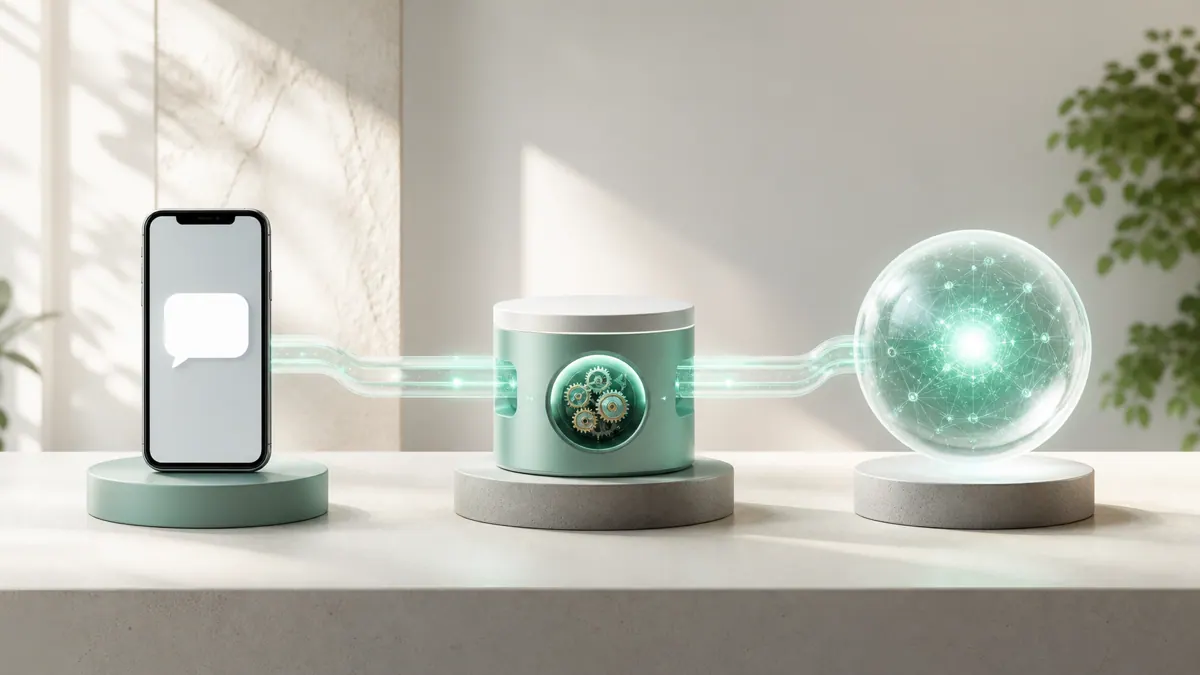
A production WhatsApp AI chatbot connects three layers:
| Layer | Job | Common tools |
|---|---|---|
| Messaging | Send/receive on WhatsApp | Twilio, 360dialog, Meta Cloud API |
| Orchestration | Route messages, call systems | n8n, a serverless backend |
| Intelligence | Understand and reply | GPT / Claude + RAG over your docs |
The flow is straightforward: a message arrives via the API, hits your automation layer (many teams use n8n here), which calls the AI model with your business context and any retrieved knowledge, then sends the reply back through WhatsApp. Bookings, CRM lookups, and payments all hang off that middle layer.
Step by step
- Get API access. Set up a WhatsApp Business account through Meta or a BSP and verify your business. This is the slowest part — start early.
- Stand up the backend. A webhook receives incoming messages and a send function posts replies. n8n or a small Next.js API route both work well.
- Add the AI brain. Connect an LLM. For anything beyond small talk, ground it in your content with RAG so it answers from your real prices, policies, and product info instead of guessing.
- Wire up actions. Booking, order lookup, payment links — connect the functions your bot needs to actually help, not just chat.
- Design for the 24-hour window. Build conversation flows that resolve within the window, and create approved templates for anything you send proactively.
- Test on real phones. Try it from different numbers, with typos, voice notes, and images. Confirm it hands off to a human cleanly when it should.
Real use cases that pay off
- Appointment booking for clinics, salons, and studios — check availability and confirm right in the chat.
- Order status and support for eCommerce — "where's my order?" answered instantly.
- Lead qualification for real estate and services — capture and score leads before a human calls.
- Reminders and follow-ups via approved templates — cut no-shows without lifting a finger.
Pitfalls to avoid
- Ignoring the 24-hour rule. Design around it from day one or your follow-ups will bounce.
- An ungrounded bot. A chatbot that invents prices and policies does more damage than no bot. Ground it in your real content.
- No human handoff. Always give frustrated or complex cases a clean path to a person.
- Skipping template planning. Get your proactive templates approved before launch, not after customers are waiting.
What it costs
Costs come in three buckets: the build, the AI usage, and WhatsApp's own conversation-based pricing (Meta charges per conversation, varying by country and type). Rough ranges:
| Item | Typical cost |
|---|---|
| Build (grounded bot + booking) | $3,000 – $10,000 |
| AI model usage | $50 – $400/month |
| WhatsApp conversation fees | Varies by volume & country |
Frequently asked questions
Can I use my existing WhatsApp number? Sometimes, but migrating a personal or Business App number to the API has rules and can't be undone easily. Many businesses start with a fresh number for the API.
Do customers know they're talking to a bot? Good practice is a brief disclosure, then get out of the way. Customers care about fast, correct answers far more than who's typing.
How is this different from a website chatbot? Same AI brain, different channel. WhatsApp adds async messaging, native mobile reach, and rich media — but comes with the API rules and conversation pricing a website chatbot doesn't have.
Can it take payments? Yes — you can send payment links or use WhatsApp's native payment features where available, wired through your automation layer.
Want to meet your customers where they already are? SprintX builds WhatsApp AI chatbots grounded in your business — booking, support, and lead capture — on a fixed-scope quote you own, no monthly lock-in. Get in touch and we'll map out what yours would take.
AI agents and automation
AI agents that do the work.
We build agents and automations for the repetitive work your team does by hand, and measure what they save.
Keep reading.
More on ai agents and automation
AI agents and automation · 11 Jul 2026 · 8 min read
How to Build a Custom GPT for Your Business
A practical walkthrough of building a custom GPT that actually helps your team — instructions, knowledge files, actions, and when to graduate to a real app.
AI agents and automation · 18 Jul 2026 · 9 min read
7 Intercom Alternatives in 2026 (And When a Custom Bot Wins)
A no-hype look at seven Intercom alternatives in 2026, what each is good for, and the point where a custom-built support bot becomes the smarter buy.
AI agents and automation · 18 Jul 2026 · 8 min read
Ecommerce Chatbot: Boosting Sales and Cutting Support Tickets
A practical look at how an ecommerce chatbot lifts sales and cuts support load, with real workflows, cost ranges, and a buyer-focused build plan.