Feature Flags for Teams of One to Five
Use a small, disciplined set of feature flags to separate deployment from release without creating a second configuration system nobody understands.
 SprintX Team6 min read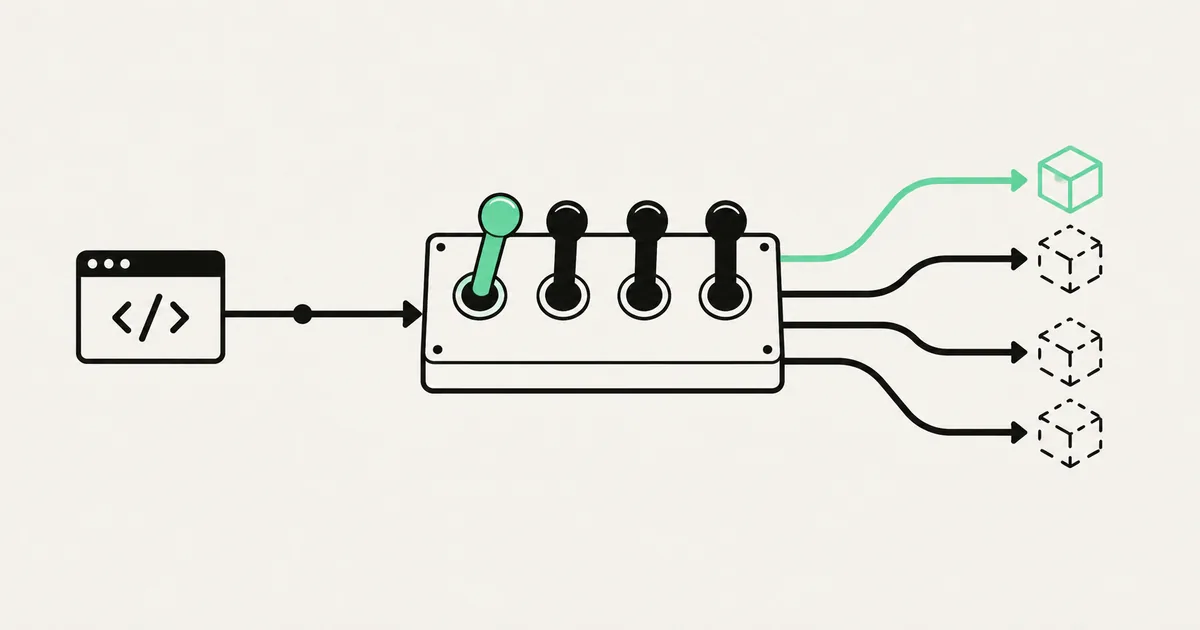
You finished a feature on Tuesday, but marketing wants to announce it next Monday. Another change is safe for internal users but risky for every account. A third needs an emergency off switch because it calls an unreliable provider.
Without feature flags, deployment and release are the same event. With a flag, you can deploy dormant code, enable it for a controlled audience, observe it, and expand access without another build. Small teams get most of that value from a deliberately small system.
Use flags for release risk, not ordinary configuration
A release flag answers whether a specific behavior is available to a specific user now. It is temporary and should disappear after rollout. A permission answers what a user is allowed to do. A product setting records a durable user choice. Mixing these concepts produces conditionals nobody dares remove.
Good small-team uses include a gradual rollout, an internal-only preview, an A/B experiment with a real decision date, and a kill switch around a costly or unstable integration. Do not hide unfinished authorization behind a client-side flag. Users can change browser state; the server must still enforce permissions.
If the application already has tangled branches and unclear ownership, address the technical debt before adding switches to every path.
Start with the smallest implementation that is safe
A database table or managed flag service can both work. The minimum useful record contains a stable key, enabled state, optional audience rule, owner, creation date, and expiry date. Evaluate important flags on the server and pass the decision to the client. Cache carefully so an emergency disable takes effect within an agreed window.
| Need | Lean implementation | Upgrade when |
|---|---|---|
| Global on/off | Environment or database value | Non-developers need control |
| Internal preview | Account or user allow list | Many audience rules appear |
| Percentage rollout | Stable hash by account ID | Experiment analysis is required |
| Emergency kill switch | Server-evaluated flag | Multi-region propagation matters |
| Entitlement | Permission or plan model | Never treat it as a temporary flag |
For one or two global flags, a typed configuration record may be enough. Once product or support needs self-service, use a small admin page or a managed provider with audit history. Avoid building a general rules engine for three booleans.
Roll out by account, not random page view
A percentage rollout must be stable. Hash an account identifier with the flag key and map it to a bucket. The same account then receives the same experience on every request, and teammates inside one workspace do not see contradictory versions.
Roll out in deliberate rings: team accounts, trusted customers, five percent, twenty-five percent, half, then everyone. Define what you watch at each ring—error rate, latency, support contacts, conversion, or AI spend—and how long you will wait. A percentage slider without stop conditions is theatre.
For multi-tenant products, evaluate at the tenant boundary unless the experiment truly requires individual variation. The guide to multi-tenancy in an AI-built SaaS explains why account context must already be trustworthy.
Test both sides and the transition
Every active flag doubles at least one meaningful path. Test disabled and enabled behavior, authorization on both sides, and what happens to data created under the new behavior if the flag turns off. A kill switch that leaves records unreadable is not a rollback.
Do not mock the flag result everywhere. Keep the decision behind one interface and use integration tests for important paths. In staging, rehearse the actual sequence: deploy with the flag off, enable it for a test account, perform the workflow, disable it, and confirm the old path still works. A dependable staging environment makes this routine.
Log flag changes and attach the active flag set to error telemetry. When failures begin at 14:03, you should be able to see that a rollout moved from ten to fifty percent at 14:01.
Give every flag an owner and deletion date
The failure mode is not usually the flag service. It is permanent conditional code. Every release flag needs an owner, a success condition, and a cleanup date. Create the removal ticket when the flag is created, not after everyone forgets why it exists.
Once a rollout reaches everyone and remains healthy, replace the conditional with the winning path and remove old tests, configuration, and data compatibility code when safe. For an abandoned experiment, remove both variants or explicitly promote one. Search by the flag key across application code, jobs, analytics, and documentation.
A monthly ten-minute review is enough for a small team: which flags are active, which are expired, and which can be deleted? If the list cannot fit on one screen, the team is using flags as storage.
Keep operations harder to misuse
Restrict production flag changes to authenticated staff and use audit logs. Require confirmation for global disables. Describe the user-visible effect beside the switch; keys such as new_flow_v2 are useless during an incident.
Define a safe default for provider failure. A new experimental feature usually defaults off. A flag that disables invoice creation may need its last known value rather than silently changing behavior. Test this failure mode instead of assuming the flag service is immortal.
Feature flags complement a reliable CI/CD pipeline; they do not replace review, tests, migrations, or rollback. They reduce the blast radius of releasing code that has already passed those gates.
Frequently asked questions
Do we need a paid feature flag platform? Not for the first few flags. A typed server-side table with audit fields is often sufficient. Pay for a platform when targeting, propagation, experimentation, or non-developer workflows would otherwise become product work.
Can feature flags secure paid features? No. The server must enforce plan entitlements and permissions independently. A flag can control rollout, but it must not be the only barrier protecting data or paid capabilities.
How long should a release flag live? Usually days or weeks, not years. Set the cleanup date when creating it and remove the losing branch soon after the rollout decision has enough evidence.
If every release is all-or-nothing, a small defect gets the blast radius of your entire customer base. SprintX adds disciplined rollout controls to AI-built SaaS products and removes the permanent flag debt afterward. Discuss your release workflow.
Building software
Systems your business runs on.
Custom platforms, internal tools and integrations that move work off spreadsheets.
Keep reading.
More on building software
Building software · 13 Aug 2026 · 8 min read
Retrofitting Multi-Tenancy Into a Single-Tenant App
Your app assumes one company per account and a customer just asked for teams. Here is how to add tenancy to a live product without a rewrite or a data leak.
Building software · 12 Aug 2026 · 7 min read
Scaling a Supabase App Past Its First Thousand Users
The specific things that break when a Supabase app goes from fifty users to a few thousand — and the fixes that work, in the order they are worth doing.

Building software · 14 Aug 2026 · 7 min read
Monitoring and Alerts for a Small SaaS
You do not need an observability stack. You need about six alerts that catch the failures that cost you money, and the discipline to keep the rest quiet.