Headless CMS vs Traditional CMS: Which Is Right for You?
A practical, jargon-free comparison of headless and traditional CMS platforms — how they differ, what each costs, and which one fits your project.
 SprintX Team8 min read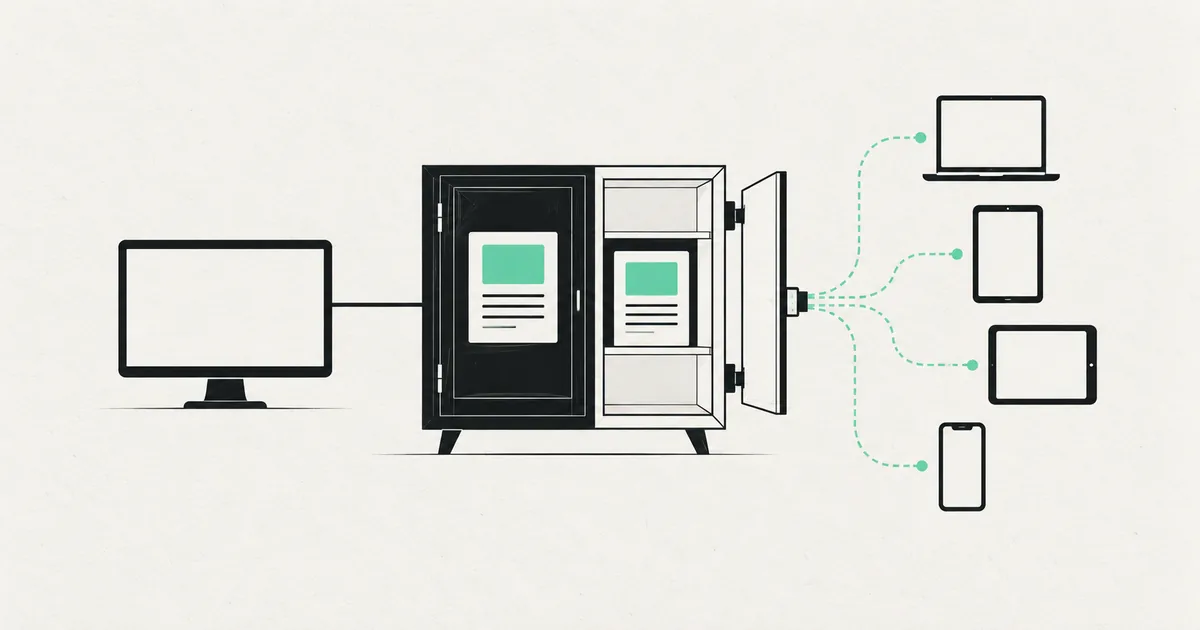
Every few years a new "way to build websites" gets sold as the answer to everything, and right now that thing is a headless CMS. The pitch is seductive: faster sites, better security, content that flows anywhere. But if your team just needs to publish blog posts and edit a few pages, going headless can be like buying a cargo van to carry your groceries.
So which one is actually right for you? This guide explains what "headless" really means, where a traditional CMS still wins, and how to make the call without a computer science degree.
What a traditional CMS actually is
A traditional CMS — WordPress, Drupal, Joomla, Squarespace — bundles everything into one system. The place where you write content is the same place that decides how it looks and serves it to visitors. Content, design, and delivery live together. This is often called a "coupled" or "monolithic" setup.
The upside is obvious: it just works. You install a theme, you get a live website, and a non-technical editor can change almost anything through a familiar dashboard. WordPress alone runs a huge share of the web precisely because that loop is so easy.
The downside shows up at the edges. The front end is tied to the CMS's rules, plugins pile up and slow things down, and reusing the same content in a mobile app or a second site is awkward. You are living inside the system's assumptions.
What "headless" means, in plain English
A headless CMS strips out the "head" — the part that renders the website — and keeps only the content management and a delivery API. You write and organize content in a clean admin (Strapi, Sanity, Contentful, Payload), and that content is served as structured data. A separate front end, usually built with a framework like Next.js, fetches that data and decides how everything looks.
The word to remember is decoupled. Content lives in one place; presentation lives in another. Because the two are independent, the same content can feed a website, a mobile app, a smartwatch, and a partner's system without being rewritten. If you want a deeper look at the front-end side of this pairing, our guide on building a Next.js site with a headless CMS walks through a real setup.

Head to head: the trade-offs that matter
| Factor | Traditional CMS | Headless CMS |
|---|---|---|
| Setup speed | Fast — live in hours | Slower — needs a custom front end |
| Editor experience | Very familiar, WYSIWYG | Clean, but preview needs wiring up |
| Performance | Depends on hosting/plugins | Excellent by default (static/edge) |
| Security surface | Larger (public admin, plugins) | Smaller (API-only, no public admin) |
| Multi-channel (app + web) | Awkward | Built for it |
| Developer flexibility | Limited by theme system | Total control of the front end |
| Ongoing cost | Lower to start | Higher up front, efficient at scale |
| Best for | Content sites, small business | Product sites, apps, large content teams |
The pattern is clear. A traditional CMS optimizes for getting a capable website live quickly with minimal engineering. A headless CMS optimizes for performance, flexibility, and reusing content across many places — at the cost of building the presentation layer yourself.
Where traditional CMS still wins
Do not let anyone shame you out of WordPress. A traditional CMS is the right answer more often than the trend crowd admits.
- You need it live this month and the budget is tight.
- Editors want to control everything — layout, images, page structure — without a developer in the loop.
- The site is mostly content: a blog, a brochure site, a local business page.
- You rely on a rich plugin ecosystem for forms, SEO, e-commerce, or memberships.
If that is you, a well-configured WordPress on good hosting will serve you for years. The mistake is bolting on fifty plugins and blaming the platform when it slows down.
Where headless earns its keep
Headless becomes worth the extra build when one of these is true:
- Performance is a business metric. You want sub-second loads, top Core Web Vitals, and a site that feels instant on mobile. A Next.js front end served from the edge delivers this naturally.
- The same content powers many surfaces. A website plus a mobile app plus in-store screens should all pull from one source of truth.
- You have a real content team. Structured content models, roles, and workflows in a tool like Sanity beat wrestling with page-builder blocks.
- You want long-term flexibility. Because the front end is decoupled, you can redesign or replatform it without migrating your content.
For product companies, SaaS marketing sites, and media brands, headless usually pays off. For a five-page service business, it usually does not.
A simple way to decide
Skip the ideology and answer three questions.
- Who edits, and how often? If non-technical people restructure pages daily, lean traditional. If content is structured and mostly filled into defined fields, headless fits well.
- How many places does the content go? One website only points toward traditional. Web plus app plus other channels points hard toward headless.
- How much does speed and scale matter? If a half-second of load time affects revenue or you expect heavy traffic, headless earns its cost.
If your answers all point one direction, you have your answer. If they are mixed, start simpler — you can always move content into a headless setup later, and it is far cheaper than over-building on day one.
Frequently asked questions
Is a headless CMS always faster than WordPress? Usually, but not magically. Headless sites are fast because they are typically pre-rendered and served from a CDN or the edge, with no plugin bloat. A well-tuned WordPress on quality hosting with caching can also be quick. The reliable speed advantage comes from the modern front end, not the word "headless" itself.
Can I keep WordPress but go headless? Yes. "Headless WordPress" uses WordPress purely as the content backend and exposes it through its API to a separate front end like Next.js. It is a popular middle path when your team loves the WordPress editor but wants a faster, more flexible site.
Does headless cost more? More up front, because someone has to build the front end that a traditional theme gives you for free. Over time, lower hosting overhead, fewer plugin licenses, and easier scaling can even it out. The real cost driver is whether you have — or hire — the engineering to build and maintain the front end.
Which is better for SEO? Both can rank well. Headless has a slight edge because speed and clean markup are easier to control, but a traditional CMS with a solid SEO plugin and good hosting competes fine. Content quality and site structure matter far more than the CMS choice.
Not sure whether your next site should be headless or a well-tuned WordPress? SprintX builds both — and will tell you honestly which one fits your team, budget, and roadmap instead of selling you the trendy option. Get a fixed-scope quote and you own the result, with no lock-in.
Building software
Systems your business runs on.
Custom platforms, internal tools and integrations that move work off spreadsheets.
Keep reading.
More on building software
Building software · 11 Jul 2026 · 8 min read
Supabase vs Firebase for Your Next App
A balanced Supabase vs Firebase comparison — database model, pricing, realtime, auth, and portability — with a clear recommendation for each kind of project.

Building software · 11 Jul 2026 · 8 min read
Next.js vs React: What's the Difference and When to Use Each
A plain-English guide to Next.js vs React — what each does, why the comparison is slightly wrong, and how to pick the right one for your project.
Building software · 8 Aug 2026 · 6 min read
CORS Errors in an AI-Generated App, Explained Properly
CORS explained without hand-waving, the specific mistakes AI-generated backends make, and why disabling it is the wrong fix even though it works.