n8n vs Make: Which Automation Platform Fits Your Workflow?
A practical n8n vs Make comparison built around simple and branching workflows, with honest trade-offs on credits, executions, hosting, and maintenance.
 SprintX Team10 min read
A lead form has stopped being “just a form.” It now validates the email, enriches the company, assigns an owner, updates the CRM, sends a reply, and alerts sales. Should you build that workflow in n8n or Make?
The honest answer depends less on a feature checklist than on how the workflow behaves. A five-module flow that handles one item at a time is a different buying decision from a branching process that fans 100 order lines through several services.
This comparison uses official product documentation and prices checked on July 11, 2026. Pricing changes, taxes and currencies vary, so confirm the linked pages before buying.
Quick verdict: Choose Make when a visual, fully managed builder and fast handoff to non-developers matter most. Choose n8n when you need code-level flexibility, execution-based cloud pricing, or control over where the platform runs. Neither wins every workflow.
The short answer by reader type
- Solo operator or operations team: Start with Make if the required apps have good native modules and nobody wants to maintain infrastructure.
- Developer or technical automation team: Start with n8n when HTTP calls, JavaScript or Python, custom nodes, and source-controlled environments are central.
- Privacy-conscious organization: Evaluate self-hosted n8n, but include security, backups, upgrades, monitoring, and support in the decision. Hosting it yourself is responsibility, not a compliance certificate.
- Team with many multi-step runs: Model both billing units using real execution history. n8n Cloud may be attractive because steps do not change its execution count; Make can still be economical when scenarios are short.
- Team that needs the vendor to operate the platform: Compare n8n Cloud with Make. Do not use Community Edition server cost as the n8n Cloud price.
n8n vs Make at a glance
| Decision | n8n | Make |
|---|---|---|
| Fast first build | Approachable, but technical options are prominent | Visual-first scenario builder is friendly for operations work |
| Complex logic | Strong branching, merge, HTTP, code, and custom-node options | Routers, filters, iterators, aggregators, and error routes on a visual canvas |
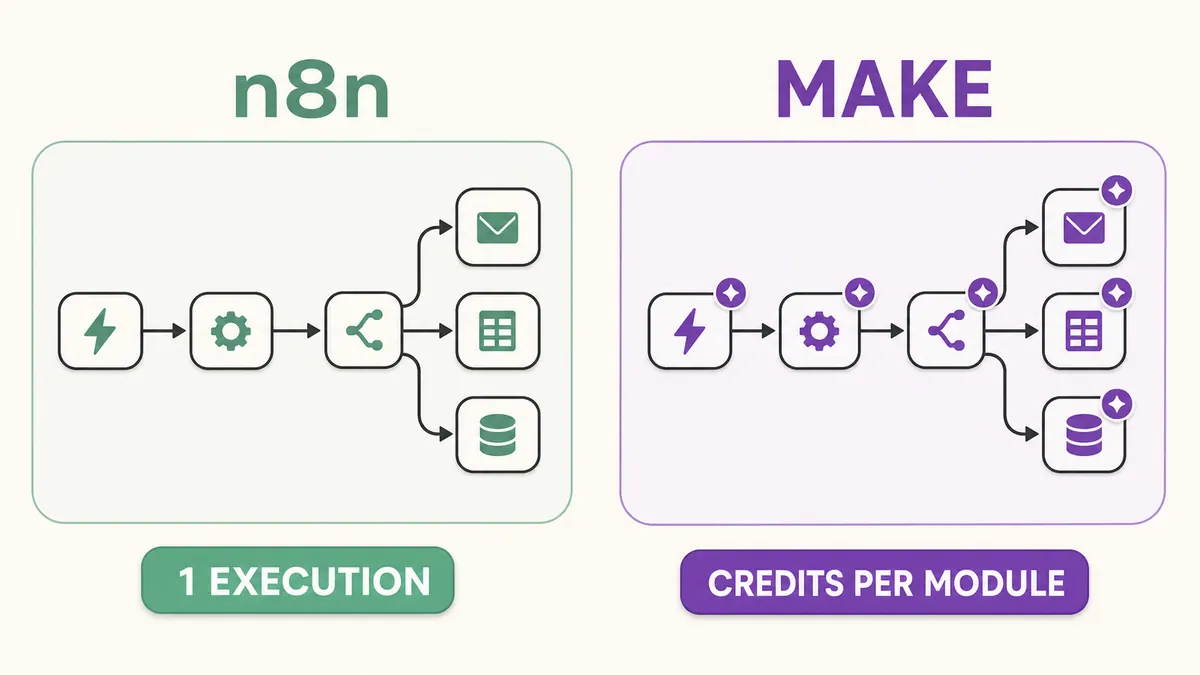
| Usage unit | Paid plans are based on workflow executions; one complete workflow run counts once, with unlimited steps | Credits are purchased and consumed; most non-AI module operations use one credit, while some AI and advanced features vary |
| Hosting | n8n Cloud, Community Edition self-hosting, and paid self-hosted plans | Vendor-managed cloud service |
| Debugging | Execution logs, editor debugging, error workflows; retention and search depend on plan | Per-module operation detail, scenario history, error handlers, and incomplete executions |
| Maintenance | Cloud reduces platform work; self-hosting makes you responsible for operations | Vendor manages the platform; you still own scenario logic, credentials, and failures |
| Likely fit | Technical teams, deep customization, hosting control, step-heavy workflows | Visual builders, managed operation, quick app-to-app scenarios |
First, understand the unlike pricing units
This is where simplistic comparisons go wrong.
According to n8n's pricing page, a workflow execution is one run of the entire workflow, regardless of its number of steps or how much data it processes. On July 11, 2026, the page listed n8n Cloud Starter at €20 per month billed annually for 2,500 executions, and Cloud Pro at €50 per month billed annually for 10,000 executions. It also listed a self-hosted Business tier at €667 per month billed annually for 40,000 executions, plus custom Enterprise plans. Those are annual-commitment display prices, not month-to-month quotes.
Community Edition is a standard self-hosted version, but “self-hosted” does not mean “free to operate.” You still pay for compute, a database if separated, storage, backups, monitoring, upgrades, incident response, and the person responsible for them. Paid Business and Enterprise features can also carry execution-based license pricing even on your infrastructure.
Make now bills in credits, not “operations” as the old pricing label. Its documentation says an operation is one module run that processes or checks data, often once per bundle such as an email, contact, or file. Credits are the billing currency: most non-AI apps use one credit per operation, but built-in AI and some advanced features can consume credits dynamically.
On July 11, 2026, Make's pricing page showed monthly prices at the 10,000-credit level of $12 for Core, $21 for Pro, and $38 for Teams; Free included 1,000 credits. Annual billing and other credit tiers change the effective price. Make also states that routers and error-handler directives themselves do not consume credits, although ordinary modules reached on a route do.
So “10,000 n8n executions” and “10,000 Make credits” are not equivalent capacity. The only useful comparison starts with a real workflow diagram and its data volume.
Worked workflow 1: capture and acknowledge a lead
Imagine this flow:
- Receive a webhook from a contact form.
- Check required fields.
- Create or update the CRM contact.
- Send an acknowledgement email.
- Notify the correct sales channel.
Setup speed and debugging
If Make has polished modules for the form, CRM, email, and chat apps, an operations user can assemble and explain this scenario quickly. Its visual run inspector makes it natural to inspect what each module received and returned.
n8n is also visual, but it becomes especially useful when validation needs a Code node, the CRM requires an unusual API call, or credentials and environments need technical ownership. Its execution view and debug-in-editor workflow let you load data from a previous execution into the editor. That saved data can contain sensitive information, so set an appropriate retention policy.
Usage counting
Suppose the workflow receives 1,000 leads in a month, each lead travels through the same five listed stages once, and no module has special credit pricing.
- n8n paid-plan estimate: about 1,000 production executions. The five stages do not turn one run into five executions.
- Make illustrative estimate: up to about 5,000 credits if all five stages are billable module operations once per lead. The actual scenario may differ: triggers, searches, bundles, retries, and app-specific modules change the count.
This is transparent arithmetic, not a benchmark. Build a sample, inspect Make's per-module credit display, and check n8n's production execution count before committing to a tier.
Likely fit
Make has the edge when speed, visual ownership, and zero platform maintenance outweigh future customization. n8n has the edge when the “simple” lead flow already includes custom validation, private APIs, or developer-managed deployment. For either tool, add duplicate protection: a webhook retry should not create a second contact or send a second email.
Worked workflow 2: route an order with branching and failures
Now consider an order workflow that:
- Receives an order and validates its signature.
- Looks up the customer and fraud status.
- Routes physical, digital, and review-required orders differently.
- Iterates through line items to reserve stock or issue licenses.
- Retries temporary API failures, records permanent failures, and alerts an operator.
- Joins the result and updates the order.
This is where the platform choice becomes more consequential.
Make's router and filters keep branches visible. Its error handlers provide routes such as ignore, resume, rollback, commit, and break; incomplete executions can preserve an interrupted run for resolution when enabled. That is powerful, but every ordinary downstream module may run once for every bundle it receives. Ten line items sent through two ordinary modules can create roughly 20 operations before counting the rest of the scenario.
n8n keeps a complete top-level run as one execution for paid-plan counting even when it contains many nodes. It supports a separate error workflow that receives failure details, and nodes can retry, continue, or emit error output depending on configuration. The trade-off is engineering discipline: branches, sub-workflows, idempotency keys, structured error records, and replay procedures must be designed rather than assumed.
For a step-heavy order flow, n8n's execution unit may be easier to forecast. That does not prove it is cheaper overall. A self-hosted deployment may require queue workers, database tuning, backups, observability, and on-call ownership. Make's credit count can rise with bundles, but managed hosting and an interface the operations team can repair may be worth more than the unit-price difference.
Hidden costs that belong in the comparison
The subscription is only one row in the budget.
- Build and change time: Native modules accelerate common integrations. Custom APIs, transformations, and undocumented edge cases consume engineering time on either platform.
- Failures and replays: Budget for alerts, idempotency, dead-letter handling, and a named owner. A workflow that silently skips an invoice is expensive even if its run costs fractions of a cent.
- Data retention: Longer execution histories help debugging but increase storage and privacy exposure. Plan limits differ.
- External usage: CRM, email, database, and AI providers still bill separately. In Make, a third-party AI module can consume a Make credit while the model provider bills tokens; Make's own AI features may use dynamic credits.
- Self-hosted operations: Include patching, TLS, secrets, database backups, restore tests, scaling, monitoring, and incident response. A small server bill is not total cost of ownership.
- Team governance: Projects, roles, audit logs, SSO, environments, and support may force a higher tier before raw usage does.
Migration is a rebuild, not an import button
Moving between Make and n8n usually means reconstructing the workflow's behavior. Inventory triggers, mappings, filters, iterators, credentials, schedules, time zones, error routes, data stores, and webhook URLs. Exported blueprints or workflow JSON are useful documentation, not cross-platform executables.
Run the old and new versions in parallel with non-destructive test data. Compare outputs, duplicate handling, timestamps, ordering, and failure alerts. For a webhook cutover, plan how queued events and retries will behave. Keep a rollback window, and do not delete the old execution history until the new flow has survived realistic failures.
When each tool clearly wins
Make wins when business users need to build and troubleshoot a mostly standard app-to-app workflow, want a visual branching model, and do not want platform operations. It is also a sensible prototype choice when you need to prove the process before investing in custom infrastructure.
n8n Cloud wins when developers need code and API flexibility but still want the vendor to host the platform, particularly for workflows with many steps per run.
Self-hosted n8n wins when deployment location or infrastructure control is a real requirement and the team can operate it safely. It is not the automatic answer for a small company with no DevOps owner.
The best final test is modest: build one representative success case and three failure cases in each platform. Measure actual executions or credits, note who can diagnose each failure, and price the plan plus the labor to keep it healthy.
If the choice still depends on assumptions, SprintX can turn one representative workflow into a scoped platform assessment and migration plan. Bring the workflow diagram, monthly event volume, and failure requirements—not just the app list.
AI agents and automation
AI agents that do the work.
We build agents and automations for the repetitive work your team does by hand, and measure what they save.
Keep reading.
More on ai agents and automation
AI agents and automation · 18 Jul 2026 · 9 min read
Zapier Alternatives in 2026: n8n, Make and When to Go Custom
A practical guide to Zapier alternatives in 2026: how n8n, Make, and others compare, and the point where a custom-built automation beats any SaaS tool.

AI agents and automation · 11 Jul 2026 · 8 min read
ChatGPT vs Claude for Business Automation: Which to Use
A practical comparison of ChatGPT and Claude for real business automation work — not benchmarks, but which model to reach for on which job.

AI agents and automation · 27 Jul 2026 · 6 min read
Cursor vs Claude Code for Building Something You Ship
Both work on your real repo, which puts them ahead of every builder. The difference is how much you see, how much you review, and what the codebase looks like in month three.