Document Processing Automation: From PDFs to Structured Data
How document processing automation extracts structured data from PDFs and forms, what the modern AI stack looks like, and what it costs to build.
 SprintX Team8 min read
Somewhere in your business, a person is retyping data off a PDF right now. An invoice into the accounting system, a shipping doc into a spreadsheet, a signed form into the CRM. It's slow, it's boring, and it's where the errors come from — a transposed digit on an invoice total, a missed line item, a date typed into the wrong field. For years the answer was "hire OCR software," and for years OCR half-worked: it read clean documents and fell apart on the messy ones that make up most of real business paperwork.
That changed with modern document AI. In 2026 the tools can read a document the way a person does — understanding that this number is the total and that one is the tax, even when the layout is unfamiliar. This guide explains how document processing automation actually works now, the accuracy you can realistically expect, what it costs to build, and where it still needs a human in the loop.
What "document processing automation" actually means
Strip away the jargon and the job is simple to state: take an unstructured document — a PDF, a scan, a photo, an email attachment — and turn it into structured data your systems can use. An invoice becomes fields: vendor, date, line items, total. A form becomes rows in a database. That's it.
The reason it's hard is that documents are gloriously inconsistent. Every vendor's invoice looks different. Scans are skewed and low-contrast. Someone photographs a receipt at an angle. Handwriting shows up in the margins. Traditional OCR — which just converts pixels to characters — chokes on all of that because it reads text without understanding it. The modern approach understands the document, which is why it survives the mess.
The pipeline has four stages:
- Ingest — capture the document from email, upload, a scanner, or an API.
- Extract — pull text and structure, using OCR for images plus a model that understands layout and meaning.
- Structure & validate — map the extracted values to your fields and check them against rules (does the math add up, is the date valid, does the vendor exist).
- Route — push the clean data into your accounting system, CRM, database, or the next step of a workflow.
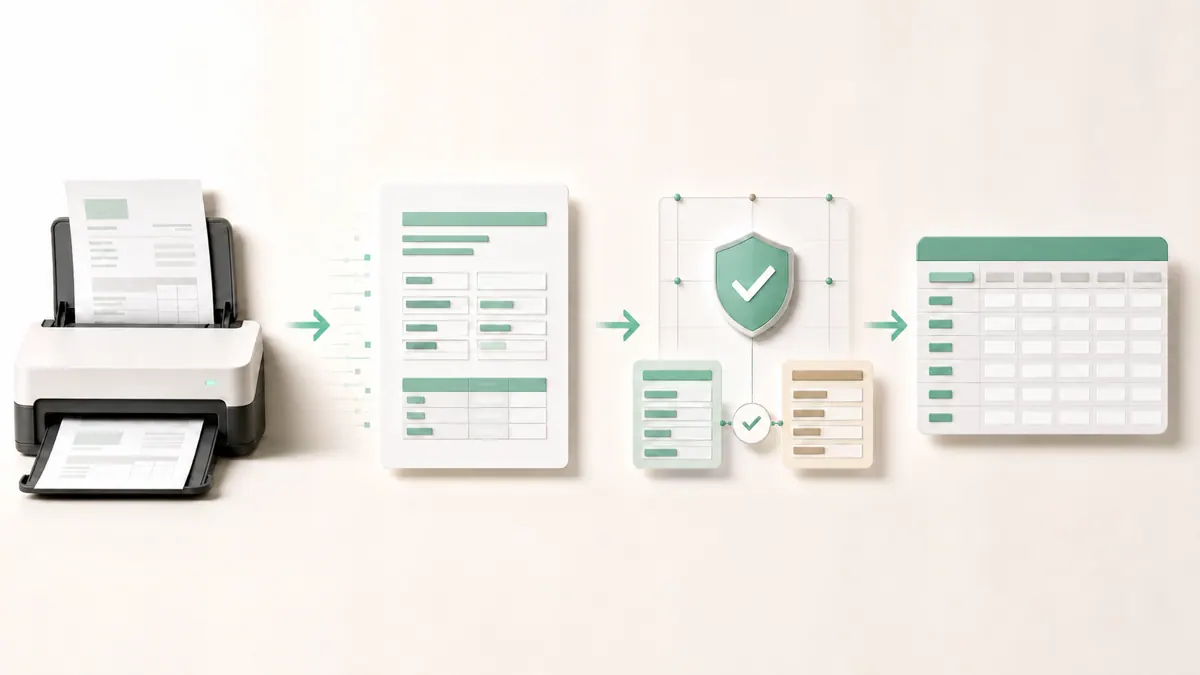
The 2026 stack: what makes it finally work
The unlock is that today's large language and vision models can read a document holistically. Instead of a rigid template that breaks when a vendor moves their total two inches to the left, a modern model understands what it's looking at. Ask it for the invoice total and it finds the total, wherever it sits on the page.
A typical build combines a few layers:
| Layer | Job | Common 2026 choices |
|---|---|---|
| OCR / vision | Turn images and scans into readable text | Cloud document-AI services; vision-capable LLMs |
| Extraction model | Understand layout and pull the right fields | A capable LLM such as the Claude or GPT-5 families |
| Validation | Enforce business rules, flag anomalies | Deterministic code + confidence thresholds |
| Orchestration | Move documents through the stages | n8n, Make, or custom code |
| Human review | Handle low-confidence cases | A review queue with a simple UI |
The important design idea is confidence-based routing. The system extracts a value and a confidence score. High-confidence extractions flow straight through; low-confidence ones drop into a human review queue. That's what makes automation safe — you're not blindly trusting the model on the 3% of documents it's unsure about. For teams already running automations, this slots naturally into an orchestration layer; if that's new to you, our primer on what workflow automation is sets the context.
Accuracy, and the human-in-the-loop reality
The honest version: modern document processing is very good on typical business documents and still imperfect on the hard ones. On clean, common formats — standard invoices, typed forms — accuracy is high enough to automate most of the volume. On degraded scans, unusual layouts, or handwriting, it drops, which is exactly why the human review queue exists.
The right mental model isn't "replace the data-entry person." It's "the data-entry person now reviews exceptions instead of typing everything." A well-designed system routes the confident majority straight through and surfaces only the uncertain minority for a quick human check. Over time, as you see which document types trip it up, you tune the rules and shrink the review pile. Anyone promising 100% straight-through automation with zero human involvement on messy real-world documents is overselling.
What this looks like in practice
A recurring pattern in our automation work is a business drowning in inbound paperwork that feeds a downstream system. A recent client project centered on invoices arriving as email attachments in a dozen different layouts, each retyped by hand into an accounting tool. We built an ingest step that pulled attachments automatically, an extraction step using a vision-capable model to read vendor, dates, line items, and totals, a validation layer that checked the arithmetic and flagged anything that didn't reconcile, and a review queue for the small share the model wasn't sure about. Clean invoices flowed straight to the accounting system; the rest got a ten-second human glance. Work like this typically runs in phases in the low-thousands-per-phase range, and it pairs closely with the same logic behind invoice automation with AI and broader accounts payable automation.
What it costs to build
Cost tracks document variety, volume, and how deeply it integrates with your systems. Hedged 2026 ranges:
| Scope | Typical range | Notes |
|---|---|---|
| Single document type, one destination | ~$2k – $5k | E.g. invoices → accounting, one format family |
| Multiple types + validation + review queue | ~$5k – $12k | Several formats, business rules, human-in-loop UI |
| High-volume, multi-system integration | $12k+ | Many sources, deep ERP/CRM integration, monitoring |
There's a running cost too: the AI model calls. Per-document cost is usually small — a modern model reading one invoice is a fraction of a cent to a few cents depending on the model tier and document size — but at high volume it's worth modeling. Using a cheaper, fast model (something in the Haiku 4.5 or Sonnet 5 class, as of mid-2026) for the bulk and reserving a more capable model for hard cases keeps it economical. If cutting model spend is a concern, our notes on reducing API costs apply directly.
Frequently asked questions
How accurate is document processing automation? On clean, common documents like standard invoices and typed forms, accuracy is high enough to automate most of the volume. It drops on degraded scans, unusual layouts, and handwriting — which is why well-built systems route low-confidence extractions to a human review queue rather than blindly trusting every result.
Is this just OCR? No. Traditional OCR converts pixels to characters without understanding them, so it breaks on unfamiliar layouts. Modern document processing pairs OCR with a model that understands the document's meaning and structure, so it can find the invoice total or the form field wherever it appears, even in a layout it hasn't seen before.
Do I still need a person in the loop? For messy real-world documents, yes — but in a much smaller role. The system handles the confident majority automatically and surfaces only the uncertain minority for a quick human check. The data-entry job shifts from typing everything to reviewing exceptions, and the review pile shrinks as the rules are tuned.
How much does document processing automation cost? As of mid-2026, a single document type flowing to one destination is roughly $2k–$5k, a multi-format system with validation and a review queue $5k–$12k, and a high-volume multi-system build $12k and up. There's also a small per-document model cost that's worth modeling at high volume.
If someone on your team is still retyping PDFs into a system every day, that's a process worth automating before it causes the next costly error. SprintX builds document processing pipelines — ingest, extraction, validation, and a human review queue — on the current AI stack, fixed-scope and milestone-based, and you own the code with no lock-in. Send us a handful of your real documents and we'll scope exactly what can be automated and what should stay human.
AI agents and automation
AI agents that do the work.
We build agents and automations for the repetitive work your team does by hand, and measure what they save.
Keep reading.
More on ai agents and automation
AI agents and automation · 18 Jul 2026 · 8 min read
AI-Powered Lead Generation Services: What an Automation Agency Actually Builds
A plain-English look at what "AI lead generation services" really means in 2026 — the systems an automation agency builds, what they cost, and where they go wrong.
AI agents and automation · 18 Jul 2026 · 8 min read
Ecommerce Order Management: How to Automate It End-to-End
How to automate ecommerce order management from checkout to delivery — the lifecycle, the tools, and where manual work quietly costs you money.
AI agents and automation · 18 Jul 2026 · 8 min read
Sales Automation That Reps Actually Use: A 2026 Guide
A practical 2026 guide to sales automation that reps adopt instead of resent — what to automate, what to keep human, and how to roll it out.