Accounts Payable Automation: From Invoice to Paid, Hands-Free
How to automate the invoice-to-payment pipeline — capture, matching, approval, and payment — without losing control of the money going out.
 SprintX Team8 min read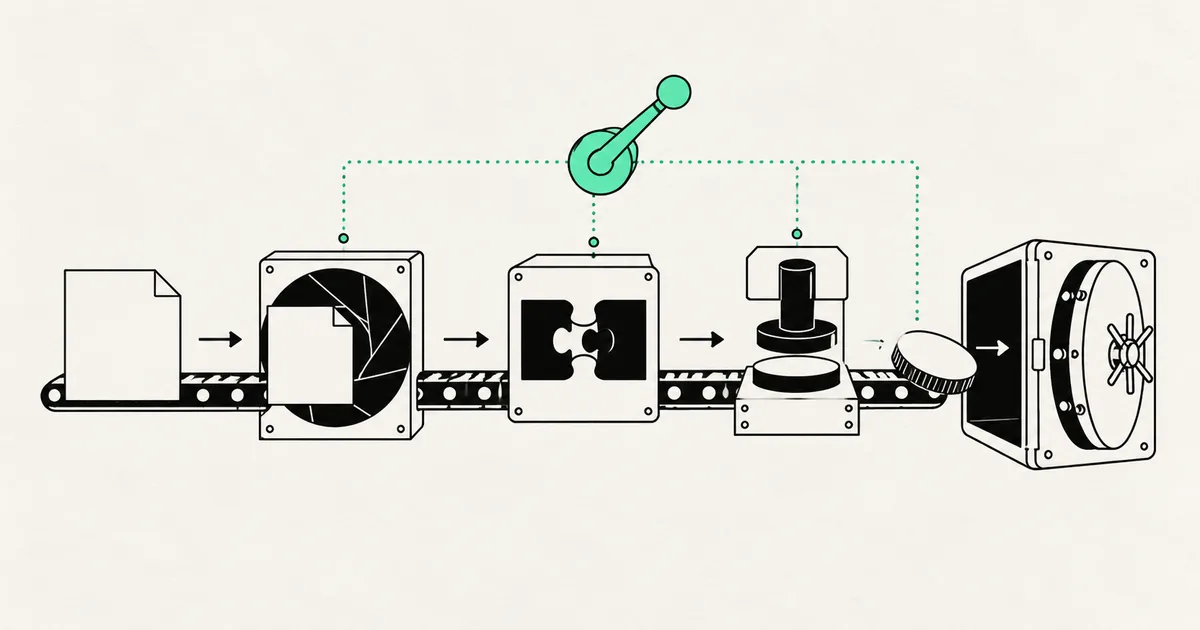
Here's the accounts payable reality in most small and mid-sized businesses: an invoice lands in someone's inbox as a PDF, gets forgotten, resurfaces as a "why haven't you paid us" email, then someone manually keys the numbers into the accounting system, chases an approval over Slack, and finally schedules a payment — often late enough to cost a discount or annoy a supplier.
Every step of that is data-entry and coordination a machine can do faster and more accurately. Accounts payable automation turns the invoice-to-pay pipeline into a flow that mostly runs itself, while keeping a human exactly where you want one: approving the money that actually goes out. Here's how it works end to end, what to automate, and where the line sits.
The invoice-to-pay pipeline, step by step
"AP automation" sounds like one thing but it's really five stages, and you can automate them one at a time:
- Capture — get the invoice out of the PDF or email and into structured data: vendor, invoice number, line items, amounts, dates, PO reference.
- Match — compare it against the purchase order and goods received (the classic two- or three-way match) to confirm you're paying for what you actually ordered and got.
- Code — assign the right general-ledger account, cost center, and tax treatment.
- Approve — route to the right approver based on amount and department, with the invoice and match result attached.
- Pay & record — schedule the payment, execute it, and write the transaction back to your accounting system with a full audit trail.
The manual version of this leaks time at every handoff. The automated version moves an invoice from inbox to "approved and scheduled" in minutes, flagging only the ones that don't match cleanly.
Where AI changes the game
Older AP tools relied on rigid templates — they broke the moment a vendor changed their invoice layout. Modern accounts payable automation uses a current language model to read an invoice the way a person does, regardless of format. It pulls the fields correctly whether the invoice is a clean digital PDF, a scanned page, or an oddly formatted one-off.
That's the difference between automation that covers 30% of your invoices and automation that covers the vast majority. The same document-understanding pattern powers our broader work on invoice automation with AI — AP is that capability pointed at the money-out side of the business.

What to automate vs. keep human
The principle mirrors every other finance automation: automate the gathering, matching, and coding, keep a human on the decision to pay.
| AP step | Automate | Human involvement |
|---|---|---|
| Reading invoice data from PDFs/email | Yes | — |
| Duplicate / fraud-pattern detection | Yes (flag) | Review flags |
| Two- and three-way matching | Yes | Review exceptions only |
| GL coding & tax treatment | Yes (suggest) | Confirm on edge cases |
| Routing to the right approver | Yes | — |
| Approving payment | — | Human signs off |
| Clean, matched, under-threshold invoices | Auto-approve within policy | — |
| New / unverified vendor bank details | — | Human verifies |
| Writing the transaction back to the ledger | Yes | — |
The high-value, low-risk win is straight-through processing for invoices that match cleanly and fall under an approval threshold — with everything else surfaced as an exception for a human to handle. Most AP time is spent on the clean invoices that never needed a person; automation gives that time back.
The one place to be paranoid: payment security
The single highest-risk moment in AP is a change to a vendor's bank details — it's the most common invoice-fraud vector, full stop. Any automation you build must treat new or changed payment details as a hard stop requiring human verification through a known, independent channel. Automate the tedium; never automate away the control that stops money going to the wrong account.
The tools involved in 2026
You're connecting three layers: where invoices arrive, the intelligence that reads and matches them, and your accounting system.
- Your accounting / ERP system — QuickBooks, Xero, NetSuite, or similar — as the system of record. If you're mid-migration off QuickBooks, our notes on QuickBooks automation alternatives are a useful companion.
- The AI extraction layer — a current model (a capable, cost-effective tier like Claude Sonnet 5 or Haiku 4.5 is a common fit for high-volume document reading) that turns any invoice format into clean, structured data.
- Automation glue — n8n, Make, or Zapier to orchestrate capture, matching, approval routing, and write-back. n8n 2.0 is a frequent self-hosted choice when financial data needs to stay on your own infrastructure.
The integrations are what make or break AP automation — reliable, error-handled connections between your inbox, the matching logic, and your ledger. That plumbing is exactly the kind of custom AI automation work that generic connectors handle poorly at real volume.
What this looks like in practice
A recent client project replaced a manual invoice pipeline that ran on email and copy-paste. Incoming invoices — in every format their suppliers used — were read automatically into structured data, matched against purchase orders, and coded to the right accounts. Clean invoices under the approval threshold were routed straight to a one-click approval; anything that didn't match, or that involved a new vendor's bank details, was held as an exception with the discrepancy highlighted. Approved payments were scheduled and written back to their accounting system with a full audit trail. Finance stopped keying invoices and started reviewing exceptions — the same throughput with a fraction of the manual effort. Builds like this typically land in the low-thousands-per-phase range and pay back against both labor and captured early-payment discounts.
How to roll it out
- Start with capture and coding. Getting invoice data in accurately, automatically, is the foundation everything else stands on.
- Add matching next, so the system can tell clean invoices from exceptions.
- Introduce approval routing and auto-approval within tight thresholds, widening them only as trust builds.
- Lock down payment-detail changes with mandatory human verification — this is non-negotiable.
- Keep the audit trail complete so every automated action is traceable at review time.
Frequently asked questions
Is accounts payable automation safe? I don't want the system paying bills on its own. It's safe because the well-built version doesn't hand over payment authority. It automates reading, matching, coding, and routing, then a human approves the actual payment. You get the speed without giving up control of money leaving the business.
Will it work with my accounting software? Almost certainly — QuickBooks, Xero, NetSuite, and most modern platforms expose APIs the automation connects to for reading POs and writing back transactions. The connection quality is what matters, which is why the integration work is the real job.
What about invoices in weird formats? That's exactly where modern AI-based extraction beats old template tools. A current language model reads scanned, oddly laid-out, or one-off invoices the way a person would, so you're not limited to a handful of tidy vendor formats.
How does it prevent fraud? Good AP automation flags duplicates, unusual amounts, and — critically — any change to vendor bank details, which is the top fraud vector. Those flags stop for human verification rather than paying automatically, so speed never comes at the cost of a control.
Still keying invoices by hand and paying suppliers late? SprintX builds accounts payable automation on a fixed-scope quote — AI invoice capture, matching, and approval routing wired into your accounting system, with humans firmly in control of every payment. Tell us how invoices flow today and we'll map the hands-free version.
AI agents and automation
AI agents that do the work.
We build agents and automations for the repetitive work your team does by hand, and measure what they save.
Keep reading.
More on ai agents and automation
AI agents and automation · 18 Jul 2026 · 9 min read
RPA vs AI Agents: Which Should Automate Your Back Office?
A decision guide to robotic process automation vs AI agents: what each is good at, where each breaks, costs, and how to pick the right tool for back-office work.
AI agents and automation · 18 Jul 2026 · 8 min read
Playwright MCP Server: AI Browser Automation That Actually Works
A plain-English guide to the Playwright MCP server: how AI agents control a real browser, why it beats pixel-guessing bots, and where it fits your business.
AI agents and automation · 18 Jul 2026 · 9 min read
The Best MCP Servers for Business in 2026 (Curated + Tested)
A curated shortlist of the most useful MCP servers for real businesses in 2026 — what each connects your AI agent to, where it shines, and what to watch out for.